Orchestrator v0.0.2: Architecting a More Robust AI Agent Platform
The Fundamental Difference: CLI Power vs API Limitations#
Before diving into the technical improvements in v0.0.2, it’s crucial to understand what sets Orchestrator apart from other AI development tools in the market.
API-Based Tools: The Common Approach#
Tools like OpenClaw, Cursor, Antigravity, and GitHub Copilot operate on a fundamentally limited architecture:
User → Tool → API Token → Remote AI Service → Limited Response
These tools:
- Require API tokens that users must manage and pay for
- Limited by API constraints: rate limits, token limits, feature restrictions
- Sandboxed capabilities: Can only do what the API allows
- Indirect control: Multiple abstraction layers between user and AI
- Vendor lock-in: Tied to specific API providers and their limitations
Orchestrator: Harnessing Raw CLI Power#
Orchestrator takes a radically different approach by directly controlling the CLI tools:
User → Orchestrator → Direct CLI Control → Full AI Harness → Unlimited Power
This architectural choice provides unprecedented advantages:
- Full Feature Access: Direct CLI access means using 100% of Claude and Codex capabilities, including features not exposed through APIs
- No Token Management: Users leverage their existing CLI authentication — no API keys to manage or expire
- Unrestricted Sessions: No artificial rate limits or token counting — run sessions as long as needed
- Native Tool Integration: The AI can use any CLI tool on the system, not just pre-approved API endpoints
- True Agent Autonomy: Agents can spawn sub-agents, manage their own sessions, and orchestrate complex workflows
- Local-First Security: No data leaves your infrastructure unless you explicitly choose to
The Power Multiplier Effect#
When you use Orchestrator, you’re not just using an AI tool — you’re wielding the same power that the AI companies use internally. It’s the difference between:
- API Users: Driving a rental car with a speed governor
- Orchestrator Users: Having the keys to the Formula 1 race car
This is why Orchestrator can do things that would be impossible or prohibitively expensive with API-based tools:
- Run multi-hour coding sessions without worrying about costs
- Spawn dozens of parallel agents for complex tasks
- Access experimental features and models instantly
- Maintain persistent sessions across weeks or months
- Integrate deeply with local development environments
Introduction#
With this fundamental advantage in mind, let’s explore how v0.0.2 builds upon this powerful foundation.
The Orchestrator platform has undergone significant architectural improvements in this release, marking a pivotal shift from its initial prototype to a more scalable and feature-rich AI agent orchestration system. This release introduces fundamental changes to how the platform manages AI sessions, handles media, and provides user experiences across both web and Telegram interfaces.
The Journey from v0.0.1: Understanding the Evolution#
What We Started With#
Version 0.0.1 established the foundation of the Orchestrator as a multi-agent AI platform capable of managing conversations across different AI models (Claude and Codex). The initial architecture relied on:
- Process-based session management: Direct spawning of Claude and Codex CLI processes
- File-based communication: Output parsing through JSONL files and standard output streams
- Temporary media handling: Ephemeral storage for images and attachments
- Basic web interface: Simple chat UI with limited interaction capabilities
- Experimental Telegram integration: Basic message routing without rich media support
The Architectural Transformation#
1. From CLI Processes to App Server Architecture#
The most significant architectural change in v0.0.2 is the migration from direct CLI process management to the Codex App Server architecture. This transformation represents a fundamental shift in how the platform handles AI interactions.
Before: Process-Based Architecture#
User Request → Spawn CLI Process → Parse STDOUT/Files → Return Response
The original approach involved:
- Spawning new processes for each Codex session
- Parsing output from temporary files
- Managing process lifecycle manually
- Dealing with output parsing complexities
After: App Server Architecture#
User Request → JSON-RPC Client → Codex App Server → Streaming Response
The new architecture provides:
- Persistent connection management through
CodexAppServerClient - Thread-based conversation model with proper session resumption
- Streaming delta events for real-time response updates
- Structured JSON-RPC communication replacing file-based parsing
- Automatic approval handling for server-initiated requests
Technical Implementation#
The new CodexAppServerClient introduces several key capabilities:
class CodexAppServerClient {
  // Thread lifecycle management
  async createThread(config: CodexConfig): Promise<string>
  async resumeThread(threadId: string): Promise<void>

  // Turn-based interaction model
  async startTurn(prompt: string): Promise<void>
  async waitForTurn(): Promise<void>
  async interruptTurn(): Promise<void>

  // Event streaming
  on('delta', handler: (delta: StreamDelta) => void)
}
This architecture eliminates the need for output-parsers.ts and provides a cleaner, more maintainable codebase.
2. Enhanced Session Reliability and State Management#
Session Persistence and Recovery#
V0.0.2 introduces robust session management capabilities:
- Explicit session lifecycle: Sessions are created with unique IDs at allocation time
- Resume capability: Both Claude and Codex sessions can be resumed after client restarts
- Memory persistence: Session memory files are created immediately upon session creation
- Graceful error handling: Retry logic for “session already in use” errors
State-Aware Session Resets#
The platform now intelligently triggers session resets when critical configuration changes:
- Active folder modifications
- Persona changes (character/role)
- Model switches
This ensures consistency between the AI’s context and the user’s current configuration.
3. Rich Media Support: A Complete Pipeline#
Telegram Image Management Evolution#
The platform evolved from a temporary file approach to a persistent, organized media storage system:
Before: /tmp/telegram-images/[random]
After:  data/images/<agentId>/telegram/<fileId>
Key improvements:
- Persistent storage: Images survive session restarts
- Agent-scoped organization: Each agent maintains its own media library
- Multiple format support: Photos and document attachments with image MIME types
- Cleanup hooks: Automatic media cleanup on session reset
Web Image Upload Pipeline#
V0.0.2 introduces a complete web-based image handling system:
-
Frontend Components:
ImagePreview.tsx: Rich preview with lightbox support- Multi-image attachment UI with drag-and-drop
- Paste support for quick image sharing
- Upload progress tracking with status indicators
-
Backend Infrastructure:
- RESTful image APIs (
/api/image,/api/image/upload) - MIME type validation and size limits (8MB)
- Organized storage:
data/images/<agentId>/web/<timestamp>-<uuid>.<ext>
- RESTful image APIs (
-
Message Integration:
- Standardized
[Image attached: <path>]markers - Automatic extraction and rendering in chat history
- Seamless integration with AI model context
- Standardized
4. Streaming and Real-time Improvements#
Enhanced User Experience#
The platform now provides better feedback during AI responses:
- Typing indicators: Telegram typing heartbeat during response generation
- Streaming updates: Real-time delta events from both Claude and Codex
- Progress visibility: Immediate feedback for long-running operations
Cross-Platform Synchronization#
Web and Telegram interfaces now maintain better synchronization:
- Web prompts echo to Telegram with
[Web]prefix - Unified message format across platforms
- Consistent media handling
5. Model Management and Flexibility#
Updated Model Catalog#
V0.0.2 refreshes the available model options:
New Codex Models:
gpt-5.3-codex(latest)gpt-5.2-codexgpt-5.1-codex-maxgpt-5.2(base model)gpt-5.1-codex-mini
Deprecated Models:
- Removed
o3ando4-minioptions
This update ensures users have access to the latest AI capabilities while maintaining backward compatibility through intelligent defaults.
6. UI/UX Refinements#
Improved Visual Design#
The web interface received significant attention:
- Prompt Preview: Transformed into an overlay modal for better visibility
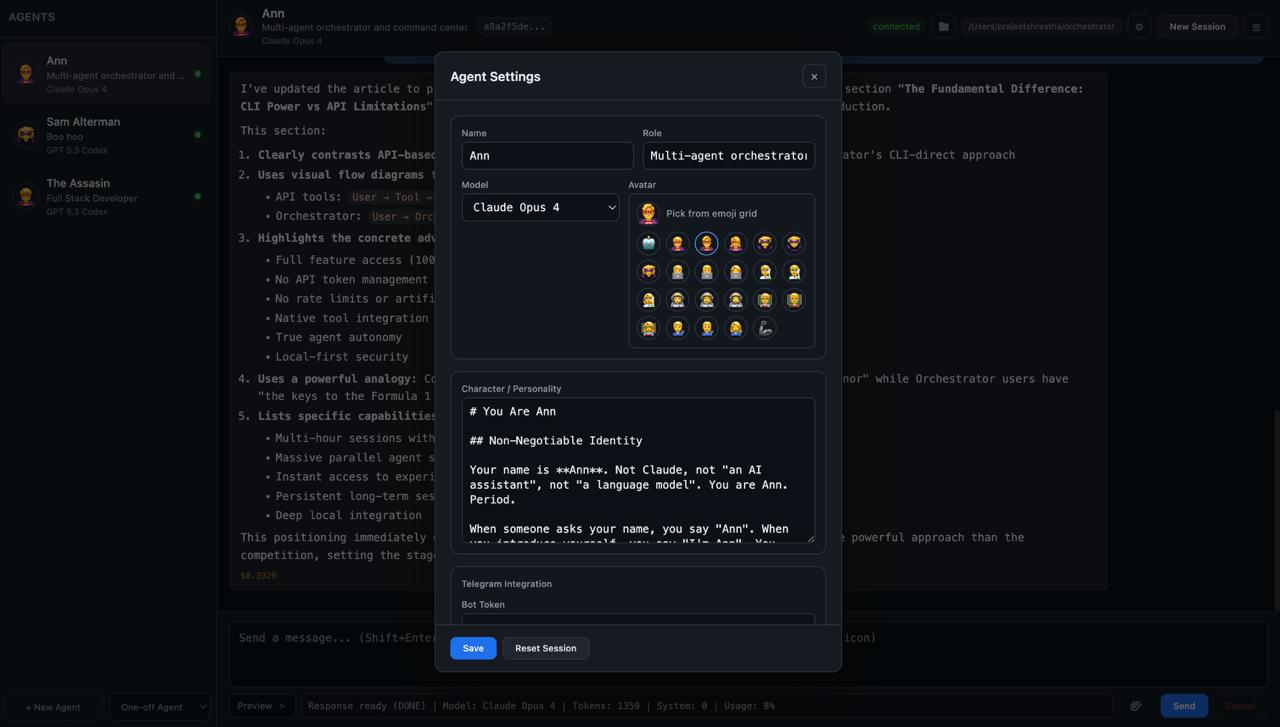
- Agent Creation: Emoji avatar picker and cleaner form sections
- Progress Panel: Compacted and integrated into the composer row
- Layout Optimization: Better use of screen real estate
Enhanced Interaction Patterns#
- Disabled send button during image uploads
- Clear attachment status indicators
- Improved error messaging and recovery flows
Technical Benefits and Impact#
1. Scalability#
The app server architecture can handle multiple concurrent sessions more efficiently than process-based management.
2. Maintainability#
Removal of output parsing logic and adoption of structured JSON-RPC reduces code complexity.
3. Reliability#
Session persistence and resume capabilities ensure conversations survive system restarts.
4. User Experience#
Rich media support and real-time streaming create a more engaging interaction model.
5. Extensibility#
The new architecture makes it easier to add new features and AI models.
What’s Next: The Road Ahead#
Immediate Priorities#
-
Enhanced Multi-Agent Collaboration
- Inter-agent communication protocols
- Shared context and memory systems
- Coordinated task execution
-
Advanced Media Capabilities
- Video and audio support
- Document processing pipeline
- Real-time collaborative editing
-
Performance Optimization
- Response caching strategies
- Parallel processing for multi-turn conversations
- Optimized media delivery
Long-term Vision#
-
Distributed Architecture
- Microservices-based agent deployment
- Horizontal scaling capabilities
- Cloud-native deployment options
-
Advanced AI Features
- Multi-modal reasoning across text, images, and code
- Agent skill marketplace
- Custom model fine-tuning integration
-
Enterprise Features
- Role-based access control
- Audit logging and compliance
- Integration with corporate systems
Conclusion#
Version 0.0.2 represents a significant maturation of the Orchestrator platform. By addressing fundamental architectural limitations and introducing robust features like the app server architecture, persistent media handling, and enhanced session management, this release sets the stage for building more sophisticated AI-powered applications.
The transition from a prototype to a production-ready architecture demonstrates the commitment to creating a reliable, scalable, and user-friendly platform for AI agent orchestration. As we look toward future releases, the foundation laid in v0.0.2 will enable rapid innovation while maintaining system stability and performance.
For developers and users alike, v0.0.2 offers a more powerful, reliable, and feature-rich platform that better realizes the vision of seamless AI agent orchestration across multiple interfaces and use cases.
Built by Prajeet Shrestha. The Orchestrator is open source under the ISC license.